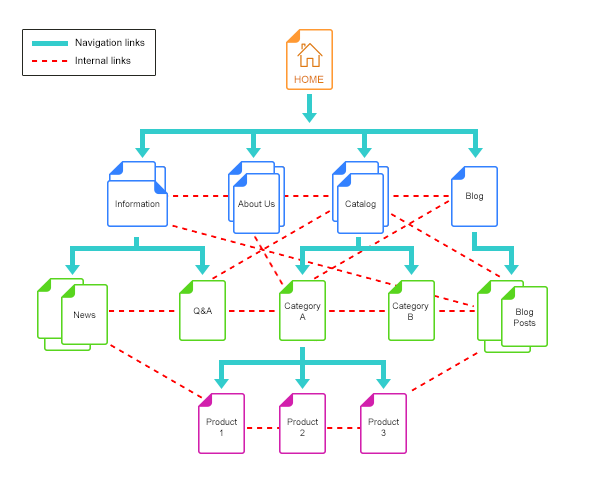
Internal links are one of the simplest ways to improve the relationship between pages on a website. A strong internal linking system helps visitors discover relevant information and gives search engines additional context about your site’s architecture. Google also recommends making important pages discoverable through internal links and using descriptive, relevant anchor text rather than generic link labels. Google’s link best practices provide the current technical guidance.
What is internal linking?
An internal link connects one page on your website to another page on the same website. Examples include navigation links, related articles, breadcrumbs, category links, contextual links, and product links.
1. Start with your most important pages
List the pages that matter most to the business: core services, important categories, high-value products, conversion pages, and strategic guides. These pages should have clear paths from relevant sections of the site.
2. Build topic clusters
Use a pillar-and-cluster model where a broad guide links to specific supporting articles and those supporting articles link back to the broader resource when useful.
For example, a technical SEO pillar can connect to pages about migrations, redirects, JavaScript SEO, structured data, site architecture, and performance. On LogixScale, this relationship is visible in the Technical SEO service, the technical SEO audit checklist, the website migration SEO checklist, and the Core Web Vitals guide. Each page serves a different intent, so the links reinforce the cluster instead of creating duplicate pages. JavaScript-heavy implementations now have a dedicated JavaScript SEO guide covering crawlability, rendering, routing, and indexing.
3. Use descriptive anchor text
Anchor text should help users understand the destination. “Read more” can work, but descriptive anchors such as “website migration SEO checklist” provide more context when they fit naturally.
4. Avoid forced keyword repetition
Internal links are for navigation and context, not for repeating the same exact keyword dozens of times. Vary anchor text naturally while keeping it descriptive.
5. Find orphan pages
An orphan page has no useful internal links pointing to it. Important content should generally have a discoverable place in the site’s architecture.
When you find an orphan page, decide whether it deserves links, should be consolidated, or should be removed. For a newly published article, make this decision before launch: identify at least one relevant existing page that should introduce readers to it, then add links from the new article to the pages that provide the next useful step.
6. Link from strong contextual pages
A relevant contextual link from a detailed article can be more useful to a visitor than a generic link buried in a footer. Look for natural opportunities where one page helps explain another.
7. Keep navigation simple
Your main navigation should represent the site’s most important destinations. Do not put every URL in the primary menu. Use categories, related links, breadcrumbs, and contextual navigation for depth.
8. Fix links to redirects and broken URLs
If internal links point to URLs that redirect, update the links to the final destination where practical. Also repair broken internal links discovered through crawling.
9. Use breadcrumbs where they help
Breadcrumbs can show users where they are within a site’s hierarchy. On large websites, they can also provide another consistent internal navigation path.
10. Create a maintenance process
Internal linking is not a one-time project. Every time you publish a new strategic article, ask which existing pages should link to it and which pages it should link to. For LogixScale’s ecommerce cluster, for example, the ecommerce keyword mapping guide can help define page roles, while the category page SEO guide and product page SEO guide cover two different implementation intents.
Internal linking checklist
- List priority pages.
- Identify orphan pages.
- Map topic clusters.
- Review navigation.
- Improve contextual links.
- Use descriptive anchors.
- Repair broken links.
- Replace links to unnecessary redirects.
- Review breadcrumbs.
- Add internal links to new content during publishing.
Final takeaway
A good internal linking strategy turns a collection of pages into a connected information system. Focus on helping users move from one useful resource to the next, and the resulting architecture will usually be clearer for search engines too.
A practical internal-link audit workflow
For a site with a growing content library, use this workflow before publishing another article:
- Map the page role: label the page as a pillar, cluster article, supporting resource, or commercial destination.
- Find the closest existing answers: identify pages that solve adjacent problems without serving the exact same search intent.
- Add contextual links: place links where the reader would naturally need the next explanation, using concise descriptive anchors.
- Check the reverse path: add a link from at least one relevant existing page to the new or updated resource when that relationship is genuinely useful.
- Test every destination: remove links that 404, point to the wrong page, or unnecessarily pass through redirects.
This approach is more useful than chasing a fixed link count. Google explicitly says there is no magical ideal number of links for a page; relevance, crawlability, context, and usefulness matter more.
Related: SEO Services · Website Migration SEO · More LogixScale insights
Watch: How Google recommends using internal links
Google Search Central’s Martin Splitt explains why internal links help visitors and Googlebot, how to use proper HTML links, and why meaningful anchor text matters.
Related LogixScale resources
Build the wider SEO cluster with our technical SEO audit checklist, website migration SEO checklist, Core Web Vitals guide, ecommerce keyword mapping guide, ecommerce category page SEO guide, ecommerce product page SEO guide, and SEO service.